- Published on
Why the Grandeur GN7 App Has No Remote Parking Button
- Authors

- Name
- Indo Yoon
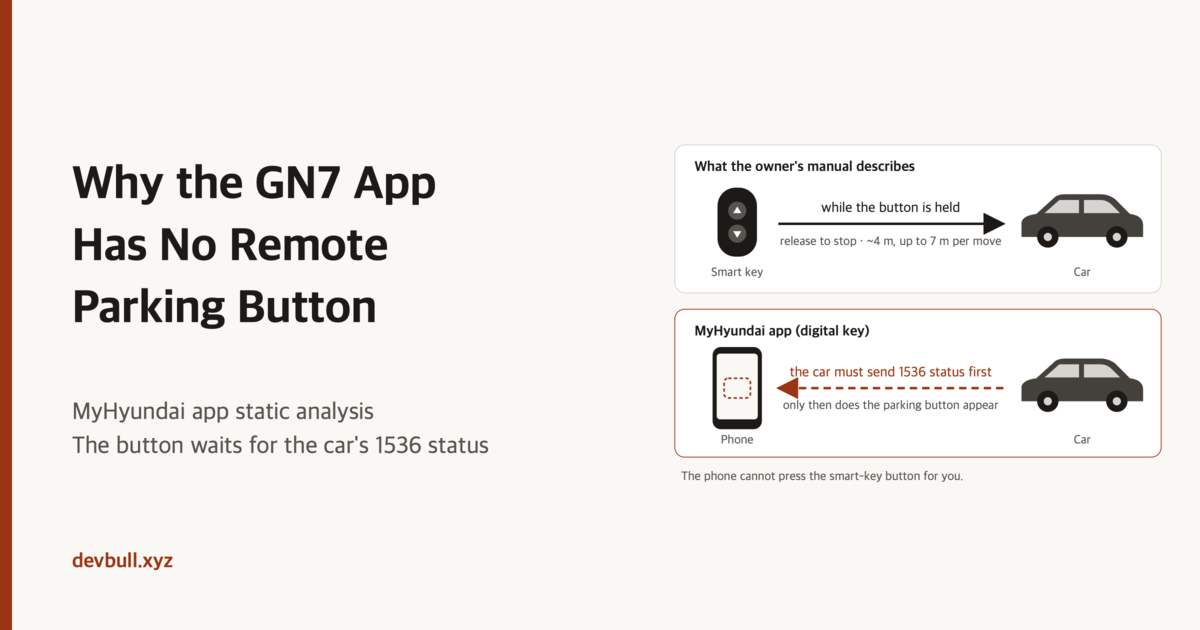
With the smart key, the car creeps forward and backward. The MyHyundai app has no such button. Opening the app shows this is not Hyundai hiding a button per model name. But an absent button also does not mean "the car's digital-key controller never answered function 1536."
This post is the result of statically analyzing the MyHyundai Android app (com.hyundai.oneapp.kr) in November 2026 and reading two pages of the 2026 Grandeur (GN7) owner's manual in the original. It does not describe any procedure for moving the car.
Conclusion
Remote forward/reverse on the GN7 is a smart-key button procedure in the owner's manual. Digital key never appears in that procedure.
The phone-side remote parking button is separate. The Digital Key 2 card on the home screen attaches it only after drawing at least one other control button, and only when getRspaSupportedFlow() is true. That value starts false. There is exactly one realtime path that turns it true: the car sending a status packet for RKE function 1536 (0x0600). The status code is not checked — the packet's arrival alone sets it true. Reconnecting with the same key can also revive the value from the previous session's cache.
On a normal connection the app never asks for 1536 specifically. So the observation "the button is missing" cannot be read as "the controller stayed silent to a 1536 query" — the app never sent that query.
Forcing the button on does not create model support. The remote parking code exists in the app because it is an SDK shared across all models. Unless the car sends 1536 status, names the phone as the control owner, and first supplies the values the phone's packet needs, the car will not accept phone commands.
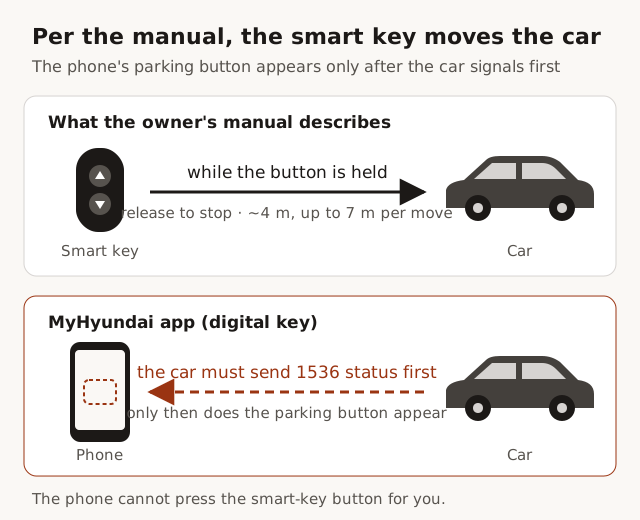
The manual only describes the smart key
I opened the two GN7 2026 web help pages directly.
The remote forward/reverse introduction page begins (Korean original, translated here):
The remote smart parking assist function can be operated remotely from outside the vehicle using the smart key.
Source: 2026 Grandeur (GN7) Remote Smart Parking Assist
The preparation and movement steps on the operating page are all smart key: door lock, remote start, forward, reverse. "Carry the smart key and leave the car" is the boarding condition. The forward or reverse button on the smart key must stay held during movement; releasing it stops the car. Operating distance is about 4 m, up to 7 m per move, and the function releases past 14 m in total. Digital key never appears on this page.
Source: 2026 Grandeur (GN7) Remote Smart Parking Assist operation
Sentences like "move the car forward or backward with the smart key or digital key," which show up in search results, are not on these two pages. The same topic number carries different content per model folder. These two pages in the GN7 2026 folder describe the smart-key procedure.
The button is not gated by a model table
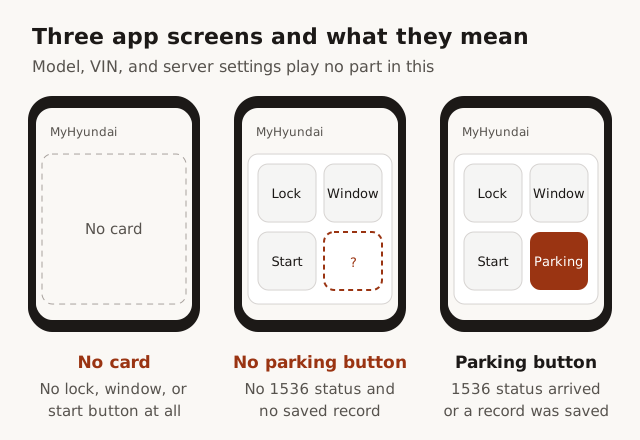
The Digital Key 2 control card (HomeVehicleDigitalKey2ControlButtonsCard) on the MyHyundai home works like this.
- It builds a button list from server vehicle info and digital-key entitlements — lock, windows, start, and so on.
- Conditional buttons survive only after the car has listed that RKE function in its status list.
- If zero buttons remain, the card is not drawn at all. The remote parking button disappears with it.
- If at least one button remains, the remote parking button (
ic_filled_rspa, stringccs_ctn_rspa) is attached only when the remote parking support flow inDigitalKey2ViewModelis true.
Model code, VIN, and a server-side "this car supports remote parking" flag play no role in these conditions. The app contains isVehicleOemSupported(vin), but a search across all DEX files finds zero call sites. A dev-only mock keeps a fake implementation of that function returning true, but the production path never uses it.
The support flow starts false. Two paths write true:
| Path | When | What it uses |
|---|---|---|
| Realtime | RKE function status packet with functionId 1536 | true, regardless of the status value |
| Cache | Same key ID reconnects and apply runs | the boolean saved last time |
| Disconnect | RKE clear | resets to false and leaves the value in the key cache |
Function statuses other than 1536 go to the status map of ordinary buttons like lock and windows, and never touch the remote parking flag.
So when other digital-key buttons are visible but remote parking is not, the card was drawn and the flag is simply false. In this session's connection no 1536 status packet arrived, and the cache did not hold true either.
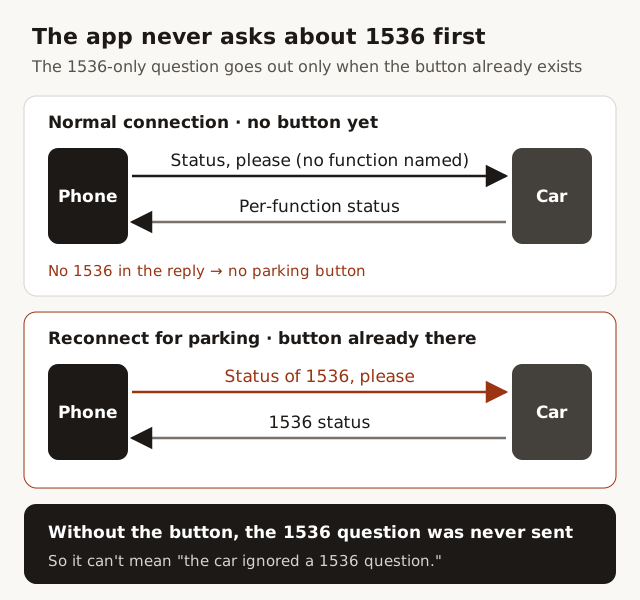
The app does not normally ask for 1536
There is code that sends a status request naming 1536 alone: RemoteService.connect. Three conditions:
- the connection type is remote parking
- an existing connection on the same key is active
- the remote parking support flag is already true
With the button missing — flag false — this branch is never entered. The 1536-only query is a reconfirmation for "reconnecting as remote parking after support was already decided."
The normal digital-key path from home is different. With Bluetooth permission granted and RKE registration successful, the app sends a status request about 1.5 s after connecting. The function number array is empty there. The production implementation passes that array unchanged into the Google Play Services digital key API. Whether an empty array means "give me every function" is decided inside Play Services, not in this APK. Without Bluetooth permission, or when RKE registration fails, the status request never goes out at all.
Summing up:
| Observation | What the code says | What the code does not say |
|---|---|---|
| Only the remote parking button is missing | No 1536 status packet this session; cache not true | The controller ignored a 1536 query |
| The card itself is missing | The control button list was empty, or this screen wasn't shown | May be unrelated to 1536 |
| The button is present | A 1536 status packet arrived, or the cache was true | The controller just answered 1536 |
Code in the app is not evidence of support
com.hmg.ccs.sdk.dk2.rspa contains start, stop, forward/reverse, parallel exit, engine status, and control owner (phone / smart key). This SDK is shared across every Hyundai model. A function existing in the binary does not mean the GN7 implements it. That is where the missing button fits: the app does not remove features by model table; it opens the button when the car reports 1536 status. If the GN7 never reports it, the button never appears.
To build a forward/reverse packet, the phone needs values from the car first. Without them the app gives up on packet creation and ends with an error. A session already entered with the smart key keeps the smart key as the control owner, and the app refuses phone intervention. Mimicking the radio frequency is a separate, earlier problem. The manual's actuator is the smart-key button; the app's actuator is digital-key function 1536. The phone is not a transmitter that presses the fob's buttons on its behalf.
This path in the Android app runs through the Google Play Services digital key API. Nothing in this APK proves the same class tree exists in the iPhone app.
The boundary software cannot cross
Rooting the phone and overwriting the support flag to true can draw the button. That is UI. The car is unchanged. Unless the car emits 1536 as a status, the app will not open the button in the first place, and even a forced-open button's commands do not stand unless the car takes the phone as the control owner of that function. The manual documents that operation for the smart key only.
The remaining change is Hyundai adding phone-based remote forward/reverse to the GN7's digital-key controller and owner's manual. An app patch cannot manufacture that line.
What this post did not measure
No real-vehicle BLE logs were captured. How Play Services interprets the empty function array is outside this APK. The Blue Link Store's Remote Smart Parking Assist 2 product page would not open in this environment, so the list of sold models was not used as evidence. The grounds are the app bytecode and the two manual pages above.
Korean version: 그랜저 GN7 앱에 원격주차 버튼이 없는 이유